Showing posts with label Technology. Show all posts

Friday, 25 April 2014

Eath's Cousin Found! A Planet Where Life Might Be Possible


Scientists now believe that they may have found Earth's cousin planet, a planet with most suitable conditions for sustaining life. 490 light-years away from Earth, this planet revolves around a dwarf sun. The Sun is called Kepler-186 and the planet being sixth in its orbit, Kepler-186f.

The planet is a little larger than earth. Its diameter is 1.1 times that of earth. But since it's sun is also a bit smaller than earth's, it makes up for it. The distance of this planet from it's sun makes researchers suspectible that it might have perfect conditions for harboring water.

Although Planet is a bit on the outer most edge of habitable zones of it's star, water may have frozen there but because of it's size, it's quite safe to assume that water will be in liquid form. Hence assumption that alien life form exists there is quite possible.

Source: Space.com

Google Contact Lens: Lenses with Built-in Cameras


Google Glasses were one of the most popular gadgets when first introduced. But now, the next big thing is here. After Google Glasses, Google has now announced to launch Google Lens.

Google has announced that Google Lens is under development. This technology will let the user view and record the world through an advanced lens which will be intelligent. This lens will let the user zoom, take pictures, record videos and use many many more features using the camera in the lens.

Google Lens will also allow the user to user to analyze the live stream, recognize faces, confirm patterns and even increase human sight capabilities.  The lens will also differentiate color objects and even user's bio data.

With the ability of checking the bio data from tear water in eye, the lens now makes it possible to check user's sugar level and other medical info. This will also be used for security purposes and only allowed user will be able to use it.

The users will be able to control the lens through remote devices like cell phones or wrist watches.

Source: Technovenom
Image Sources: [1] [2]

Monday, 21 April 2014

Glow-in-the-dark Self-charging highway constructed in Netherlands

Proposed by Daan Roosegaarde, back in October 2012, this idea seemed far fetched and impossible to achieve. But now that it has completed it's initial steps, people are forced to say that it feels like being in a fairytale.

The initial design included self changing temperature markings that would be able to tell weather conditions, like snow marking on extreme low temperatures, Indicators for wind and glowing markings that would show the way to the drivers. Idea also included Induction coils to charge up the electric cars as they drive by. But like all the great ideas, a step by step implementation is always done.

Currently a 500, road has been opened for experimental driving. It as of now, can absorb sunlight and convert the energy to illuminate the road at night. Idea has been achieved using a photo luminescent powder in mixture with the paint. Right now, it isn't clear if the paint is wear resistant or not. However, these lights have replaced street lamps and can glow for eight hours after a days sun.


This is a huge step in advancement of technology and will be very useful to countries with energy crisis.

Source:
Wired.co.uk

Monday, 31 March 2014

How to Download Wallpapers in Firefox

Going through an interesting website, you see some image or wallpaper that you like. Often you would like to download it for using as desktop background or any other use. Well, if that website doesn't allow you to do that, here's an easy way.

Note: This tip works only for firefox users.

Step 1:

Open the website from which you want to download the image. In this example I will download from a Facebook Page.


Step 2:

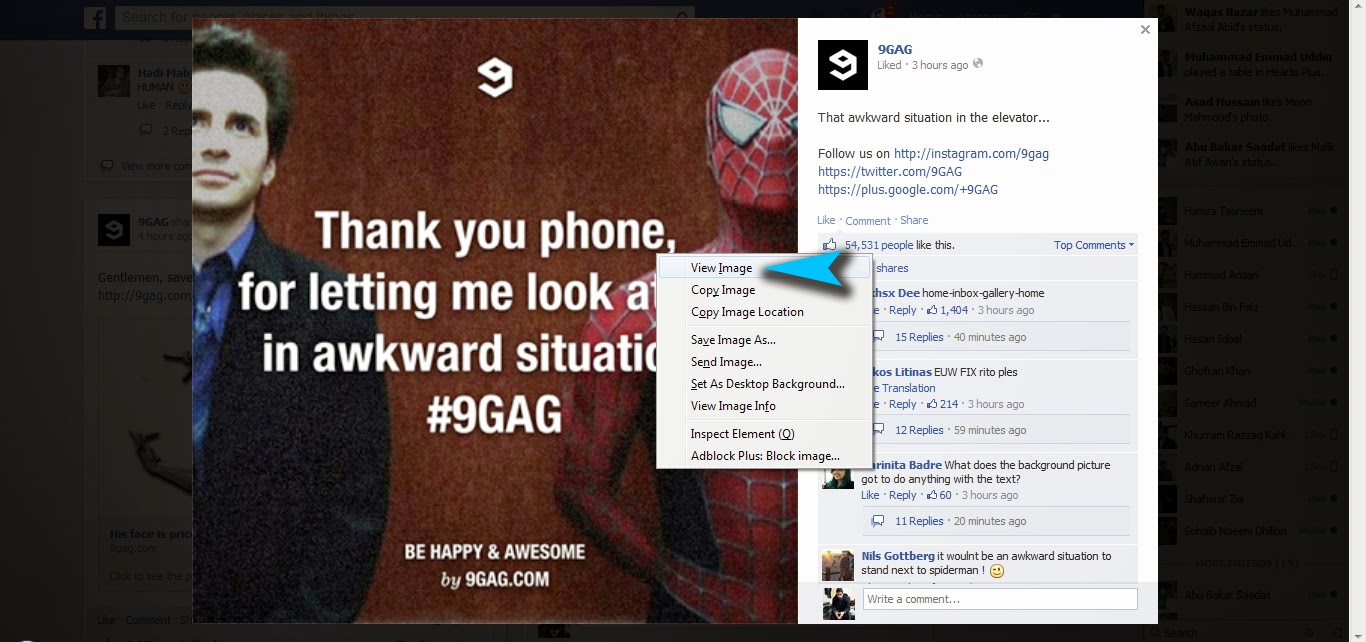
Right-Click on the image you want to download (Command+Click in case of Mac). Then click View Image.


Step 3:

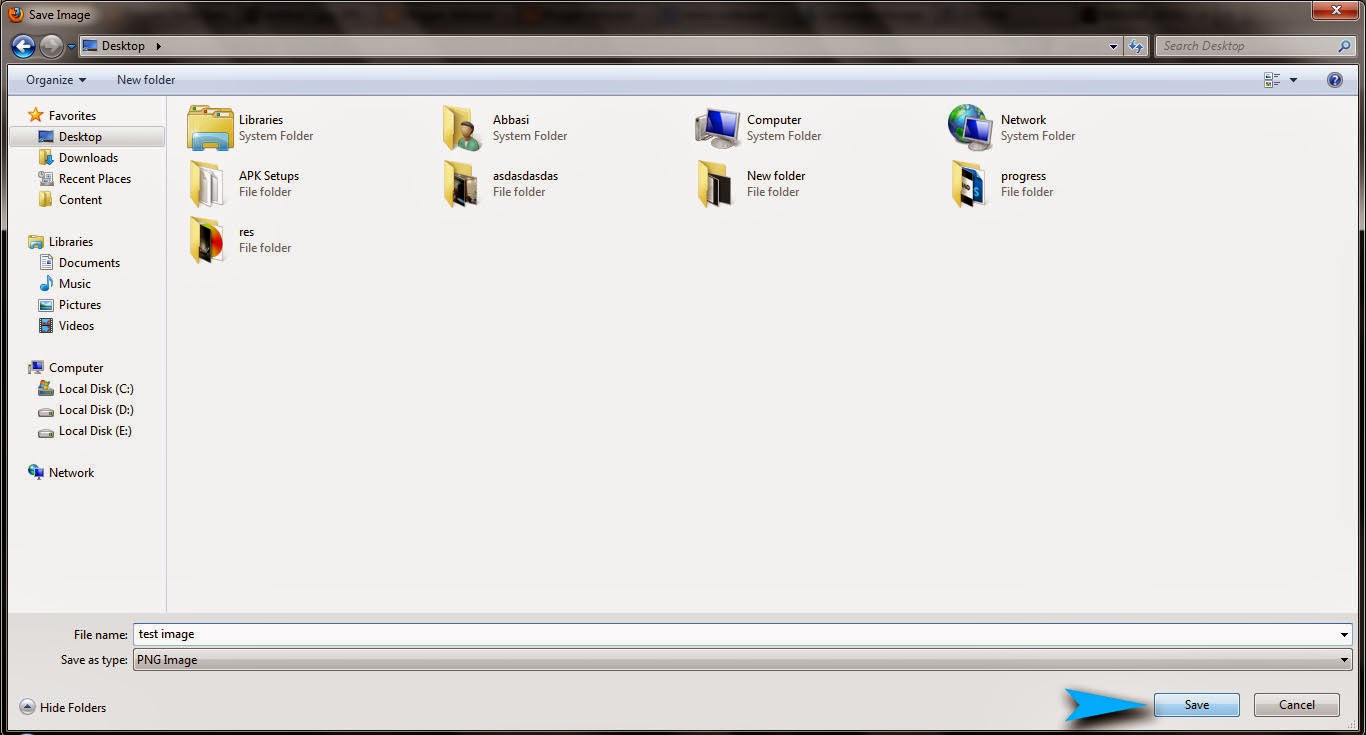
Now after the whole image has loaded. Right Click on image again and choose "Save Image As".


Step 4:

Finally name the image what ever you want to, choose a directory and click Save.

Voila! It's done!

Sunday, 30 March 2014

5 Best websites to buy stuff from online, in Pakistan

Buying stuff online is one of the best applications of the internet. How ever when you live in Middle Ease countries like Pakistan, you often have to wait a long period of time before delivery arrives.

However online business is taking up steps in Pakistan too. There are many websites now available that allow you to buy electronics and stuff online and get delivery withing few days.

Here is a list of 5 of them.


Shophive.com


Homeshopping.pk


Symbios.pk


Vmart 

Tcsconnect.com


Kaymu.pk

Daraz.pk

Recommended for Buying Clothes.

Tuesday, 25 March 2014

7 Most visited websites on Internet

There are millions of websites on the internet. Billions of active users visit these sites every day. Some sites get more visits, some less. Websites are often ranked according to monthly active users.

Here is a list of 7 Most Visited Websites on the internet. This is categorized by the number of visits in February 2014.

7. Wikipedia

Category: Reference/ Encyclopedia
Country: United States
Traffic: 3.1 Billion
Bounce Rate: 53.31%
Link:Wikipedia

6. VK

Category: Social Network
Country: Russian Federation
Traffic: 1.2 Billion
Bounce Rate: 15.22%
Link:VK

5. Live

Category: Email

Country: United States
Traffic: 3.4 Billion
Bounce Rate: 11.11%
Link: Live.com

4. Yahoo

Category: Search Engine
Country: United States
Traffic: 7.2 Billion
Bounce Rate: 38.93%
Link: Yahoo.com

3. Youtube

Category: TV and Video
Country: United States
Traffic: 15.4 Billion
Bounce Rate: 23.45%
Link: Youtube.com

2. Google

Category: Search Engine
Country: United States
Traffic: 18.5 Billion
Bounce Rate: 24.23%
Link: Google.com

1. Facebook.com

Category: Social Network
Country: United States
Traffic: 23.2 Billion
Bounce Rate: 16.62%
Link: Facebook.com


Image Sources:
Source 1, Source 2, Source 3, Source 4, Source 5, Source 6, Source 7, Source 8,
Sourc 9

Wednesday, 5 March 2014

How to make a vertical SeekBar in Android

Problem:

Okay. So I was trying to make a temperature control app for a college assignment and wanted create a vertical Seek Bar. This is the method I found to set a vertical seekbar in XML.

By default a seek bar is horizontal but if you add the following line of code in XML, it can become vertical.
android:rotation="270"
Unfortunately this works only if you are working with API 11 or higher. For lower APIs, I still haven't found a solution yet. Let me Know if you find any solution.

Solution:

<RelativeLayout xmlns:android="http://schemas.android.com/apk/res/android" 
xmlns:tools="http://schemas.android.com/tools"
android:layout_width="match_parent"
android:layout_height="match_parent" >

<SeekBar
    android:id="@+id/seekBar1"
    android:layout_width="match_parent"
    android:layout_height="wrap_content"
    android:rotation="270"
    />

</RelativeLayout>

Output:


Copyright @ 2013 Abbasid.